
Here is the instructions for parents to view academic report.
Step 1, Login to Veracross Parent portal. https://pinehurst.nz/vc
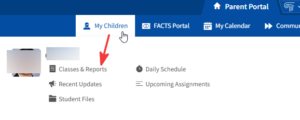
Step 2, In the top menu, select My Children and click on Classes and Reports. Or on the
home page, My Children section is also available. Select the child to view the
report. If you have more than one child at Pinehurst, you will need to select each child to view their report section.
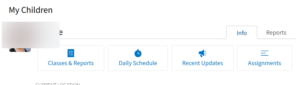
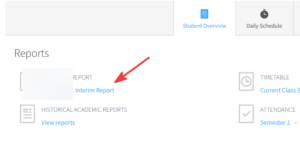
Step 3, Under the reports section, click on the Academic Report to view.
FAQs:
- Have trouble sign in to Veracross?
Check out https://pinehurst.co.nz/veracross-sign-in-faqs/ - How to view previous years report?
They are available on FACTS portal at the moment, and they will be soon copy over to
Veracross “Historical academic reports”